> ## Documentation Index
> Fetch the complete documentation index at: https://langchain-5e9cc07a-preview-cta2-1778260809-ad7a43f.mintlify.site/llms.txt
> Use this file to discover all available pages before exploring further.

# LangSmith docs

**LangSmith is a framework-agnostic platform for building, debugging, and deploying AI agents and LLM applications.** Trace requests, evaluate outputs, test prompts, and manage deployments all in one place, with your agent stack.

## Get started

<Steps>
  <Step title="Create an account" icon="user-plus">
    Sign up at [smith.langchain.com](https://smith.langchain.com?utm_source=docs\&utm_medium=cta\&utm_campaign=langsmith-signup\&utm_content=langsmith-home) (no credit card required).
    You can log in with **Google**, **GitHub**, or **email**.
  </Step>

  <Step title="Create an API key" icon="key">
    Go to your [Settings page](https://smith.langchain.com/settings) → **API Keys** → **Create API Key**.
    Copy the key and save it securely.
  </Step>

  <Step title="Choose your integration" icon="plug">
    LangSmith works with many frameworks and providers. Browse [available integrations](/langsmith/integrations) to connect your stack.
  </Step>
</Steps>

Once your account and API key are ready, choose a quickstart to begin building with LangSmith:

<Columns cols={3}>
  <Card title="Observability" icon="https://mintcdn.com/langchain-5e9cc07a-preview-cta2-1778260809-ad7a43f/ImLZteXcgfUoZlf8/images/brand/observability-icon-dark.png?fit=max&auto=format&n=ImLZteXcgfUoZlf8&q=85&s=042301bae9497f4f1a8ee7235eaf4d47" href="/langsmith/observability-quickstart" arrow="true" cta="Start tracing" width="200" height="200" data-path="images/brand/observability-icon-dark.png">
    Gain visibility into every step your application takes to debug faster and improve reliability.
  </Card>

  <Card title="Evaluation" icon="https://mintcdn.com/langchain-5e9cc07a-preview-cta2-1778260809-ad7a43f/ImLZteXcgfUoZlf8/images/brand/evaluation-icon-dark.png?fit=max&auto=format&n=ImLZteXcgfUoZlf8&q=85&s=33f494160d6db0c976d6ceedbb5c2aa0" href="/langsmith/evaluation-quickstart" arrow="true" cta="Evaluate your app" width="200" height="200" data-path="images/brand/evaluation-icon-dark.png">
    Measure and track quality over time to ensure your AI applications are consistent and trustworthy.
  </Card>

  <Card title="Deployment" icon="https://mintcdn.com/langchain-5e9cc07a-preview-cta2-1778260809-ad7a43f/ImLZteXcgfUoZlf8/images/brand/deployment-icon-dark.png?fit=max&auto=format&n=ImLZteXcgfUoZlf8&q=85&s=59f3194227412b3fffdddb39e09723b9" href="/langsmith/deployment" arrow="true" cta="Deploy your agents" width="200" height="200" data-path="images/brand/deployment-icon-dark.png">
    Deploy your agents as Agent Servers, ready to scale in production.
  </Card>
</Columns>

## More ways to build

<Columns cols={4}>
  <Card title="Fleet" icon="https://mintcdn.com/langchain-5e9cc07a-preview-cta2-1778260809-ad7a43f/ImLZteXcgfUoZlf8/images/brand/fleet-icon-dark.png?fit=max&auto=format&n=ImLZteXcgfUoZlf8&q=85&s=2d33b45b1ac424bbe884c3af942a5502" href="/langsmith/fleet/index" arrow="true" cta="Build an agent" width="203" height="203" data-path="images/brand/fleet-icon-dark.png">
    Design and deploy AI agents visually without writing code.
  </Card>

  <Card title="Prompt engineering" icon="https://mintcdn.com/langchain-5e9cc07a-preview-cta2-1778260809-ad7a43f/ImLZteXcgfUoZlf8/images/brand/prompt-engineering-icon.png?fit=max&auto=format&n=ImLZteXcgfUoZlf8&q=85&s=8efa0972fc63f08a7d21d7033965b8fa" href="/langsmith/prompt-engineering-quickstart" arrow="true" cta="Test your prompts" width="200" height="200" data-path="images/brand/prompt-engineering-icon.png">
    Iterate on prompts with built-in versioning and collaboration to ship improvements faster.
  </Card>

  <Card title="LangSmith CLI" icon="terminal-2" href="/langsmith/langsmith-cli" arrow="true" cta="Use the CLI">
    Query and manage traces, datasets, experiments, and more from the terminal.
  </Card>

  <Card title="Studio" icon="window" href="/langsmith/quick-start-studio" arrow="true" cta="Develop with Studio">
    Use a visual interface to design, test, and refine applications end-to-end.
  </Card>
</Columns>

## Infrastructure

<Columns cols={2}>
  <Card title="Platform setup" href="/langsmith/platform-setup" icon="server-2" arrow="true" cta="Choose how to set up LangSmith">
    Use LangSmith in managed cloud or in a self-hosted environment to match your infrastructure and compliance needs.
  </Card>

  <Card icon="shield-lock" title="Security & compliance" href="https://trust.langchain.com/" arrow="true" cta="Visit Trust Center">
    LangSmith meets the highest standards of data security and privacy with HIPAA, SOC 2 Type 2, and GDPR compliance. [Meet with our team](https://www.langchain.com/contact-sales) to learn more or visit our [Trust Center](https://trust.langchain.com/).
  </Card>
</Columns>

## Workflow

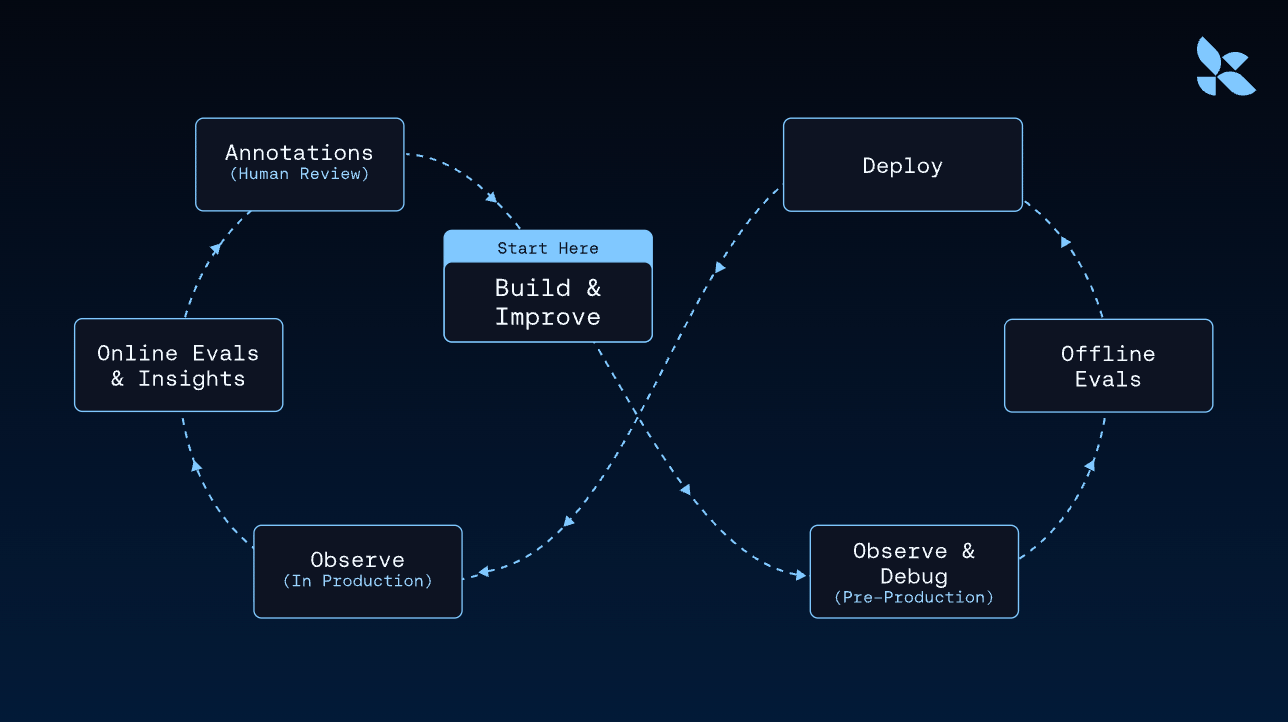
LangSmith combines observability, evaluation, deployment, and platform setup in one integrated workflow—from local development to production.
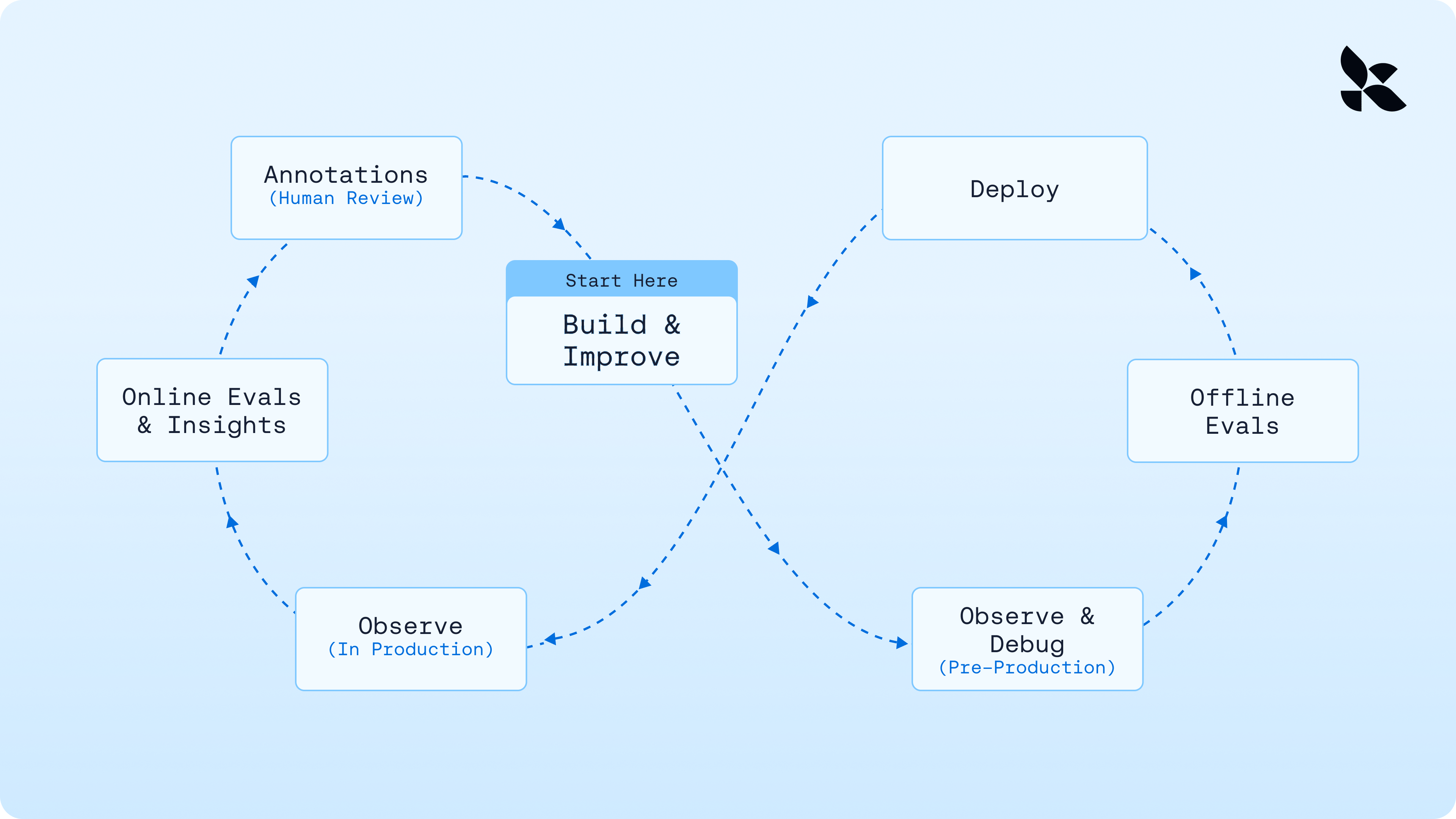
<img className="block dark:hidden" src="https://mintcdn.com/langchain-5e9cc07a-preview-cta2-1778260809-ad7a43f/mzqmUosE7AK47-8g/langsmith/images/overview-light.png?fit=max&auto=format&n=mzqmUosE7AK47-8g&q=85&s=0d247946b2f2e5060208eae4427e7b34" alt="Diagram showing how LangSmith integrates observability, evaluation, deployment, and platform setup in a single workflow from development to production." width="3840" height="2160" data-path="langsmith/images/overview-light.png" />

<img className="hidden dark:block" src="https://mintcdn.com/langchain-5e9cc07a-preview-cta2-1778260809-ad7a43f/mzqmUosE7AK47-8g/langsmith/images/overview-dark.png?fit=max&auto=format&n=mzqmUosE7AK47-8g&q=85&s=d1b68ca7f6bd8dd8273ba719efb0c5a3" alt="Diagram showing how LangSmith integrates observability, evaluation, deployment, and platform setup in a single workflow from development to production." width="1288" height="722" data-path="langsmith/images/overview-dark.png" />

***

<div className="source-links">
  <Callout icon="terminal-2">
    [Connect these docs](/use-these-docs) to Claude, VSCode, and more via MCP for real-time answers.
  </Callout>

  <Callout icon="edit">
    [Edit this page on GitHub](https://github.com/langchain-ai/docs/edit/main/src/langsmith/home.mdx) or [file an issue](https://github.com/langchain-ai/docs/issues/new/choose).
  </Callout>
</div>
